03 · Windows desktop AI companion

TITAN

A Windows companion for voice, research and ongoing work. Hold Ctrl+Alt+Z to talk, review consequential actions, and pick up with persistent context after a restart.

Desktop companion · v0.16.2Private Windows app · active development
The challenge
Make an AI companion useful across long-running work without losing control of voice, actions or private context.
The approach
Separate the desktop shell, speech lifecycle, reasoning and tool execution. Persist work explicitly and require review at consequential boundaries.
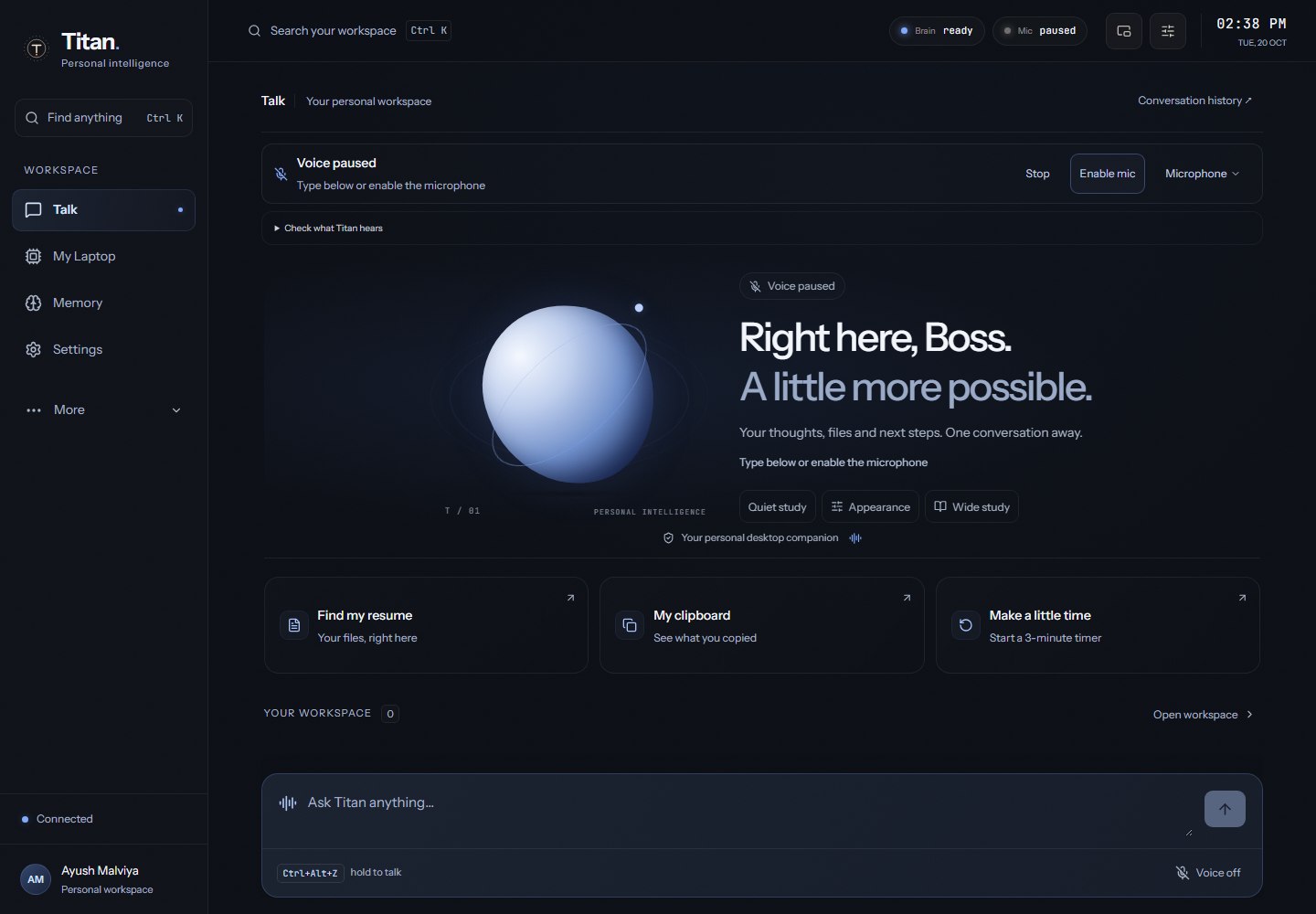
TITAN desktop companion showing its Talk workspace, hold-to-talk shortcut and conversation input with isolated sample data.
TITAN 0.16.2 production interface, captured 20 October 2026 in its isolated UI fixture. Sample data; no live model, microphone or real desktop actions.
Watch the TITAN interface recording

Actual production interface with isolated sample data: create, pause and resume a timer. No live model, microphone or real desktop actions. No audio.

Explore the original voice prototype

What it is

TITAN evolved from a Hinglish voice assistant into an Electron desktop companion. Its React workspace brings together conversation, reviewed memory, research, files, timers and a separate browser. Hold-to-talk gives each recording a clear beginning and end; durable work context keeps goals, resources and next steps across restarts. The earlier wake-word build remains in the development history below.

How it works

Hold the shortcut or type a request. TITAN interprets it, validates the tool path, asks for review where required and reports the result. Goals, resources and next steps remain available after a restart.

  1. 01

    Hold or type

    Ctrl+Alt+Z owns one recording session; release sends it, while Stop discards it.

  2. 02

    Speech becomes a request

    Speech recognition and voice playback are separate services; typed input uses the same conversation path.

  3. 03

    Reason with context

    A configurable reasoning provider receives the conversation and relevant work or reviewed memory.

  4. 04

    Validate and review

    Tools enforce their own boundaries; browser form submission requires explicit approval.

  5. 05

    Execute and report

    Return the observed tool result. Interrupted work is not silently promoted to success.

  6. 06

    Continue later

    Persist goals, resources, next steps and action history with revision checks and atomic writes.

Engineering decisions

Give each voice hold an owner

A hold session owns its preparation, recording and cancellation. Releasing the key sends that session; stopping discards it.

The tradeoff
Explicit hold-to-talk adds a physical interaction, but makes microphone state and cancellation easier to understand. Optional wake mode remains available.
How to assess it
A documented recovery fix prevents a delayed failure from an older keypress from cancelling a newer hold. The repository includes a hold-hotkey recovery regression.

Persist progress without inventing success

Store work revisions and an action journal alongside goals, resources and next steps. Check revisions before applying asynchronous results.

The tradeoff
More lifecycle bookkeeping is required, and interrupted actions can remain unknown until verified. That is preferable to recording an unobserved success.
How to assess it
The work-context implementation includes stale-result guards and interrupted-work recovery. Locking also invalidates stale authentication responses and thumbnail generations.

Check browser destinations at connection time

Route TITAN’s separate browser through a loopback proxy that resolves, checks and pins public destination addresses for each connection.

The tradeoff
The browser has stricter network boundaries, with no silent direct fallback. Local and private-network destinations are deliberately restricted.
How to assess it
The 0.16.2 release documents the DNS-rebinding gap and its connection-time address-pinning fix, including redirects and subresources. Form submission still needs explicit review.

By the numbers

Test counts are from TITAN’s 0.16.2 release record dated 19 October 2026. They describe that recorded release run; this portfolio capture exercises the isolated UI, not live speech or physical desktop acceptance.

0.16.2

recorded desktop release

249/249

isolated regression scripts

24/24

UI / native suites

127.0.0.1

local backend binding

What I built

  • Hold-to-talk with a ready chime, release-to-send and Stop-to-discard; typed input and optional wake mode remain available
  • Persistent work context, an action journal and reviewed memory with correction and forgetting; interrupted actions retain an honest unknown state
  • Research with sources, bounded file access, PDF exports and durable timers with pause and resume
  • A separate browser profile with explicit form-submit approval and connection-time public-address checks; no silent direct-network fallback
  • Sandboxed renderer, trusted-frame IPC, PIN sessions and lock revocation; revision checks reject stale responses after locking

Under the hood

A companion beyond one conversation

  • Reviewed personal and learned memory supports correction, suggestions and forgetting.
  • Work context keeps goals, resources, next steps and an action journal across restarts.
  • Research sources, bounded files, PDF exports and durable timers share the desktop workspace.
  • A native companion bubble and a separate browser profile extend the main window.

Lessons built into the system

  • Ownership tokens prevent an old voice-session failure from cancelling a new recording.
  • Authentication revisions reject late responses after lock; thumbnail generations prevent stale private pixels returning.
  • Interrupted work stays unknown until its outcome can be established.
  • Connection-time destination checks close the gap between validating a hostname and the browser resolving it later.

Release scope

  • Private Windows application; no public app download is implied by this portfolio.
  • The recording uses deterministic fixture services and temporary storage. It demonstrates UI and timer behavior, not model quality or voice recognition accuracy.
  • Physical voice accuracy, sleep/reboot and real Office workflows are separate acceptance checks.

Stack

  • Electron
  • React
  • TypeScript
  • Vite
  • Tailwind CSS
  • Node.js
  • Express
  • OpenAI-compatible Responses
  • Speech-to-text / TTS
  • PowerShell
  • Playwright
Build history: the original voice prototype

This earlier build introduced the wake word, Hinglish turn detection and three-provider fallback. The current desktop companion builds on that work.

Hindi / Hinglish voice assistant · 3-lane LLM fallback

A JARVIS-style assistant for Windows: say "Hey Titan" in Hindi, Hinglish or English, and it does the job on the laptop — then answers in English.

Always-on speech recognition with voice activity detection, a fuzzy-matched wake word, barge-in and turn detection that waits out half-finished Hinglish sentences. The brain is an LLM with a three-lane fallback, and function calling turns each request into a real action on the PC.

  • Three-lane LLM fallback — NVIDIA (Llama 3.3 70B), then Groq, then Gemini 2.5 Flash — switching silently when one fails
  • Wake word "Hey Titan" with Levenshtein fuzzy matching for mishears, barge-in, and semantic turn detection for English and Hinglish
  • Actions: open and close apps, search sites, play on YouTube, web search, weather, file search, volume, lock, sleep, screenshots — each reports success or failure out loud
  • Memory that survives restarts (reminders, notes, long-term facts with atomic writes); the server listens only on 127.0.0.1 with CORS locked

Challenge: Turn natural Hinglish requests into reliable desktop actions.

Approach: Use function calling to dispatch actions, with three provider lanes for fallback and spoken success or failure feedback.

Say "Hey Titan" and ask in Hindi, Hinglish or English: the request becomes an LLM function call and lands on the desktop as a real action, and TITAN answers out loud in English.

  1. "Hey Titan"

    always-on speech recognition; the wake word is fuzzy-matched (Levenshtein plus known mishears)

  2. Listening

    voice activity detection, streaming Whisper transcription, and turn detection that waits out half-finished Hinglish sentences

  3. The brain

    Llama 3.3 70B on NVIDIA, falling back to Groq, then Gemini 2.5 Flash, silently

  4. Function calling

    the LLM returns { action, args, speak } and a dispatcher runs it

  5. A real action

    apps, websites, YouTube, web search, weather, files, volume, lock, sleep, screenshots

  6. A spoken reply

    Google Cloud Neural2 voice (browser voice as backup); interrupt it any time by speaking

Separate interpretation from execution

The model returns a structured action and arguments; a dispatcher performs the desktop operation and reports the result.

Provider fallback improves availability, but different models can interpret the same Hinglish request differently. Action validation and explicit failure feedback still matter.

This case study describes the voice-assistant build shown here, including its three provider lanes, spoken failures and local-only server. It is not a benchmark of later TITAN versions.

3
LLM lanes, switching silently
"Boss"
what it calls Ayush
127.0.0.1
loopback binding, with CORS restrictions

Memory

  • Reminders that aren't lost when the tab closes
  • Notes, and long-term facts that survive restarts
  • Short-term memory of the last 3 turns, so "play that again" works

Reliability

  • Every action reports success or failure, and failures are spoken, never silent
  • Atomic JSON writes, so a crash can't corrupt memory
  • Server bound to 127.0.0.1 with CORS locked

Original stack: React · Vite · Tailwind CSS · Node.js · Express · Whisper · Llama 3.3 70B · Groq · Gemini · Google Cloud TTS · PowerShell